Mobilteg Saha
B2B Store Supplier Portal3D Twin CompanyRequest a demo / quoteSign in
What's newSaha AISolutionsERP integrationField appPackagesDemoDownload
New: Saha AI — ask your company; orders from WhatsApp messages, expenses from receiptsNew: 3D Twin Company — your factory to real scale; walk into the warehouse, open the lorryNew: B2B Store — your customers order 24/7 at their own pricesNew: Supplier Portal — order confirmation, dispatch notice, reconciliation and quotations in one place

Your field sales, shipments and ERP
in a single flow

The sales rep takes the order in the field, the warehouse picks and loads, the driver delivers, the collection is recorded — and documents with your approval Posted automatically to Logo, Netsis, Nebim, Zirve or Mikro. Stock comes from the ERP, there is no double entry, and it is reconciled every night. Purchasing, production, finance and accounting on one platform.No ERP? No problem: Mobilteg Saha, with its own stock, accounts, invoicing and accounting, a complete standalone business application ; if you move to an ERP later, simply enable the connection.

Try the demo without a password Watch the explainer videoRequest a live demo Request a demo or quote Android APK
  • Multi-tenant, with database-level isolation (RLS)
  • Field app that works offline
  • Netsis · Mikro V16 · Mikro V17
  • e-Fatura · e-Arşiv · e-İrsaliye with QNB
Explainer video · 4:34

What is Mobilteg Saha?

Field sales, warehouse, shipments, finance and ERP integration in one flow: from the sales rep's day to the warehouse, from delivery to the management dashboard – the whole system in four and a half minutes.

For more videos Our YouTube channel

New · Saha AI

AI that knows your company

Ask Mobilteg Saha a question, Order from a WhatsApp message, expense from receipt, collection from a cheque prepared for you; get an executive summary every morning and a customer briefing before every visit. Connect your own AI model or choose the Mobilteg credit package.

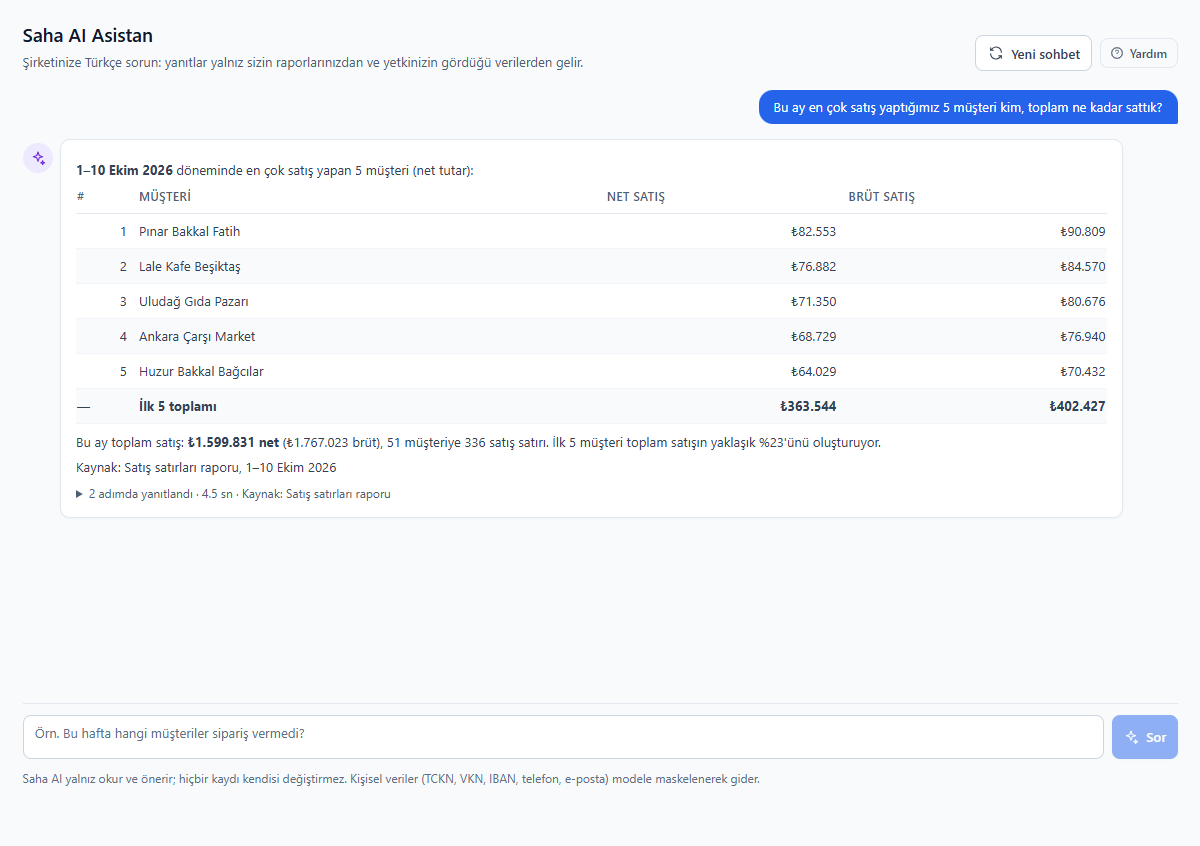
Ask your company in plain language, get answers in figures

Ask your company in plain language, get answers in figures

‘Who are our top 5 customers by sales this month?’ The assistant runs the question on your company's reporting engine, writes the result as a table and summary, and shows its source. It never makes up figures; data your permissions do not cover is never included in the answer.

Your data stays yours

TCKN, VKN, IBAN, phone numbers and email addresses are sent to the model masked. If you connect a local model, data never leaves the company.

AI suggests, you approve

AI prepares the order, expense, cheque or customer record; a person checks and saves it. It never writes to stock or accounting on its own.

Figures from your report

Answers come from the company's own reporting engine, within the user's permissions and customer scope; each answer shows its source underneath.

Your own model or credits

Use it without limits with your own API key, or with a Mobilteg credit package without the hassle of a key; the usage screen shows calls and tokens.

Early warnings

Scanned every morning: customers whose ordering pattern has broken, late collections, stock that will not sell before its expiry date, and unusual discounts and returns. "Explain with Saha AI" gives the reason and what to do.

Demand forecast and order suggestion

Demand for the coming weeks by product, how many days the stock will last and a suggested purchase; on the order form, a reasoned suggestion based on the customer's usual purchases.

Agents

Reminder drafts with a tone adjusted for overdue accounts (WhatsApp, email), customers to call today with a call script, a month-end closing list and bank statement matching suggestions. You send and approve everything.

Voice use

Ask questions by microphone and dictate orders and visit notes; answers, briefings and the daily summary are read aloud in Turkish. For sales reps and drivers on the road.

Saha AI is an add-on module; pricing below Packages section.

New · separately licensed add-on module

3D Twin Company

A live digital twin of your company: everything from taking an order to production, from warehouse transfers to deliveries by lorries and distribution vehicles, to invoicing, collections and office work – with your own data, in 3D.

Real map

Your factory at real scale

Sheet-clad warehouses, docks, a sawtooth-roofed production hall, silos, a glass-fronted office, fleet car park and gate – each at its real size on the map.

Every document comes alive on stage

The order flies from the branch to the office, a forklift picks it, the vehicle sets off and delivers stop by stop; the collection flows to the bank as a gold coin.

History, live, scenario

Replay any day at up to 3600× speed, watch today live, or ask "what if orders doubled?"

Tap to see inside

Enter the warehouse and tap a pallet on the shelf: product, bin location, quantity. Tap a lorry on the road: its load, orders, delivery notes and invoices.

Request a live demo Detailed overview

The demo company runs by itself all day: sales reps on visits, vehicles on the road, lines in production. Add-on module: price on request, included in every plan.

New · separately licensed add-on module

B2B Store

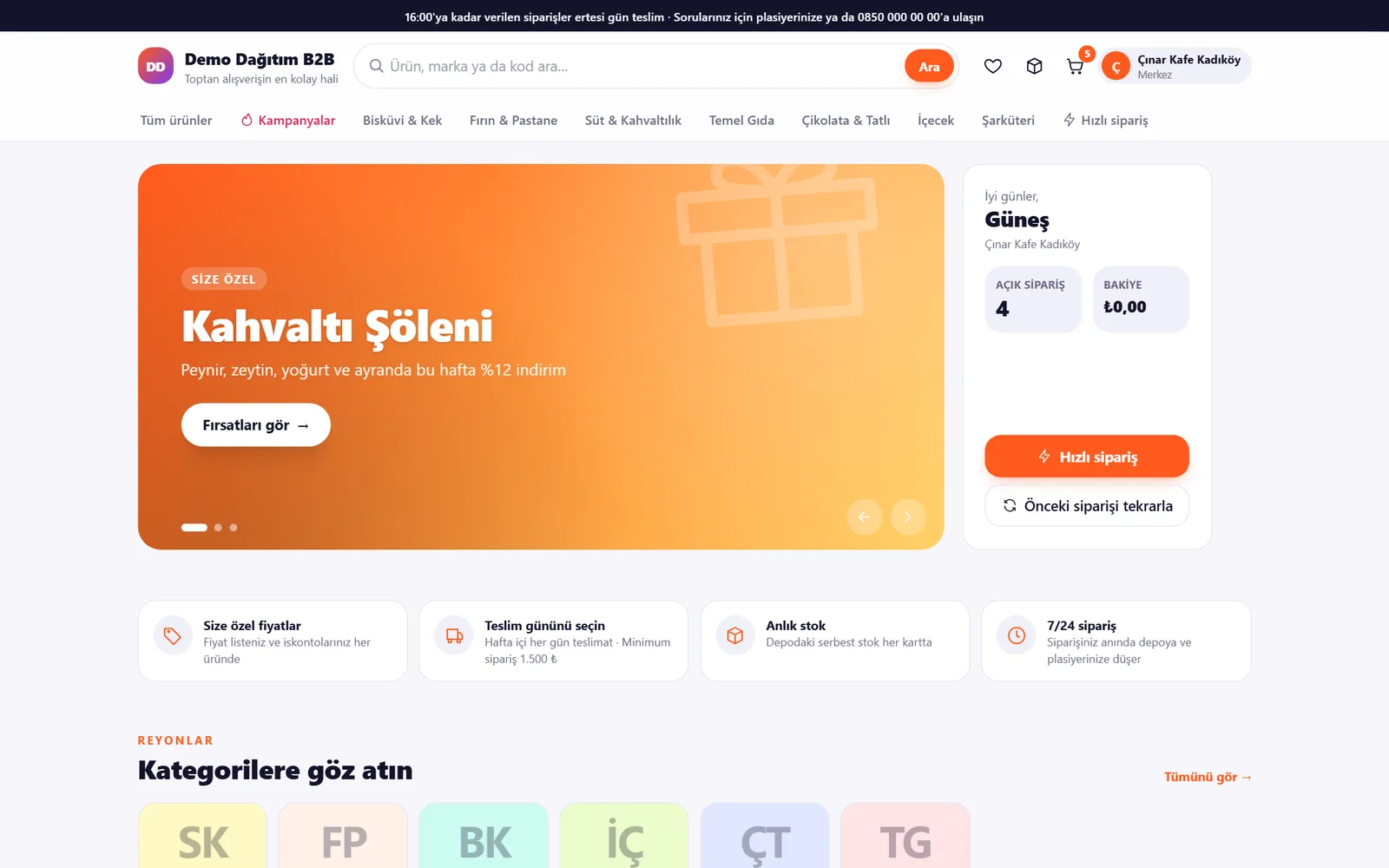
Whether your customers are dealers, grocery shops or cafés – they place their orders without waiting for the sales rep, at your special prices, even at midnight place them themselves. A real e-commerce site: storefront, promotions, basket, quick order, order tracking, balance and statement.

saha.mobilteg.com/b2b
B2B Store — Showcase

Promotion banners, aisles, your own prices and an account summary at a glance.

Every customer gets their own price

Price list, contract, chained discounts and promotions come from the same engine as field orders; the store never shows a price that the order would not accept.

Orders reach your system instantly

The customer's order reaches the warehouse, the sales rep and the approval queue; if you have an ERP connection, it is posted to Logo, Netsis or Mikro.

Delivery day and live tracking

One of the branch's delivery days is selected; the customer follows the order step by step while it is prepared, on its way and delivered.

Six themes, your brand

Showcase, Corporate, Industrial, Natural, Luxury, Night; your logo, your banners, your announcement. As powerful as B2B, as stylish as B2C.

Request a live demo Detailed overview

You enter the demo store as a customer's buyer; add to basket, place an order and track it. Add-on module: price on request, included in every plan.

New · separately licensed add-on module

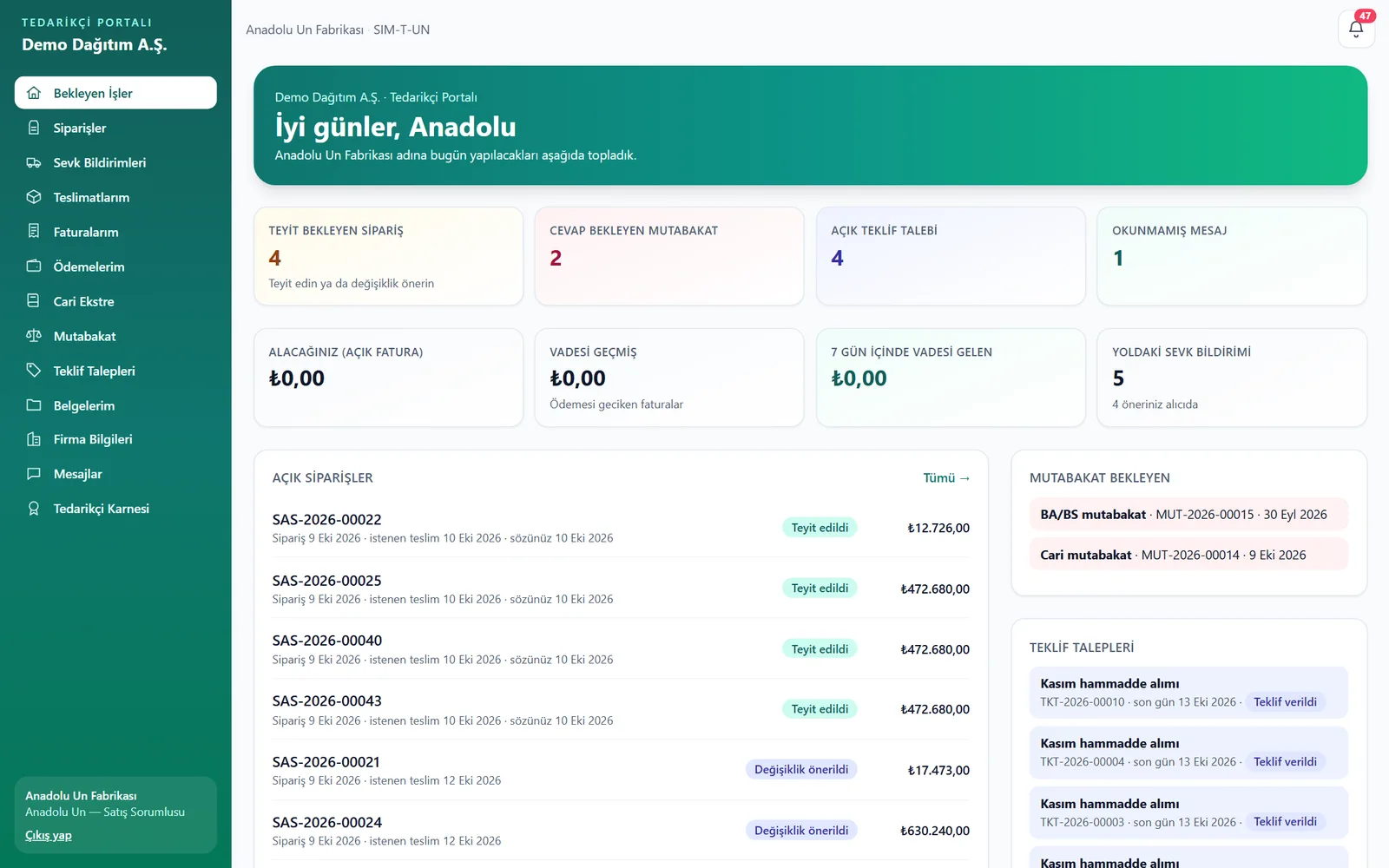
Supplier Portal

The other end of purchasing: your suppliers confirms the order, reports the shipment and tracks their own invoice and payment; they answer reconciliations and quotation requests through the portal.

saha.mobilteg.com/tedarikci
Supplier Portal — Pending tasks

Orders awaiting confirmation, upcoming deliveries, reconciliation and quotation requests, payments due – a summary of the supplier's day.

Confirmations and proposals on record

The supplier confirms the order or proposes a quantity, price or delivery date; a proposal you accept is applied to the order and the ERP.

Advance shipping notice, one-tap goods receipt

Goods in transit are notified with lot, expiry date, plate number and delivery note number; the warehouse scans the QR label and the goods receipt is recorded.

Self-service invoices, payments and statements

Suppliers see for themselves that their invoice has been processed, its payment and their account statement – no more phone calls.

Reconciliation and quotations online

Account and BA/BS reconciliations go out in bulk, and disputes come back with the difference; requests for quotation are compared side by side.

Request a live demo Detailed overview

You enter the demo portal as a supplier's sales contact. Add-on module: price on request, included in every plan, with unlimited supplier accounts.

New · in every package

Warehouse tasks and staff performance

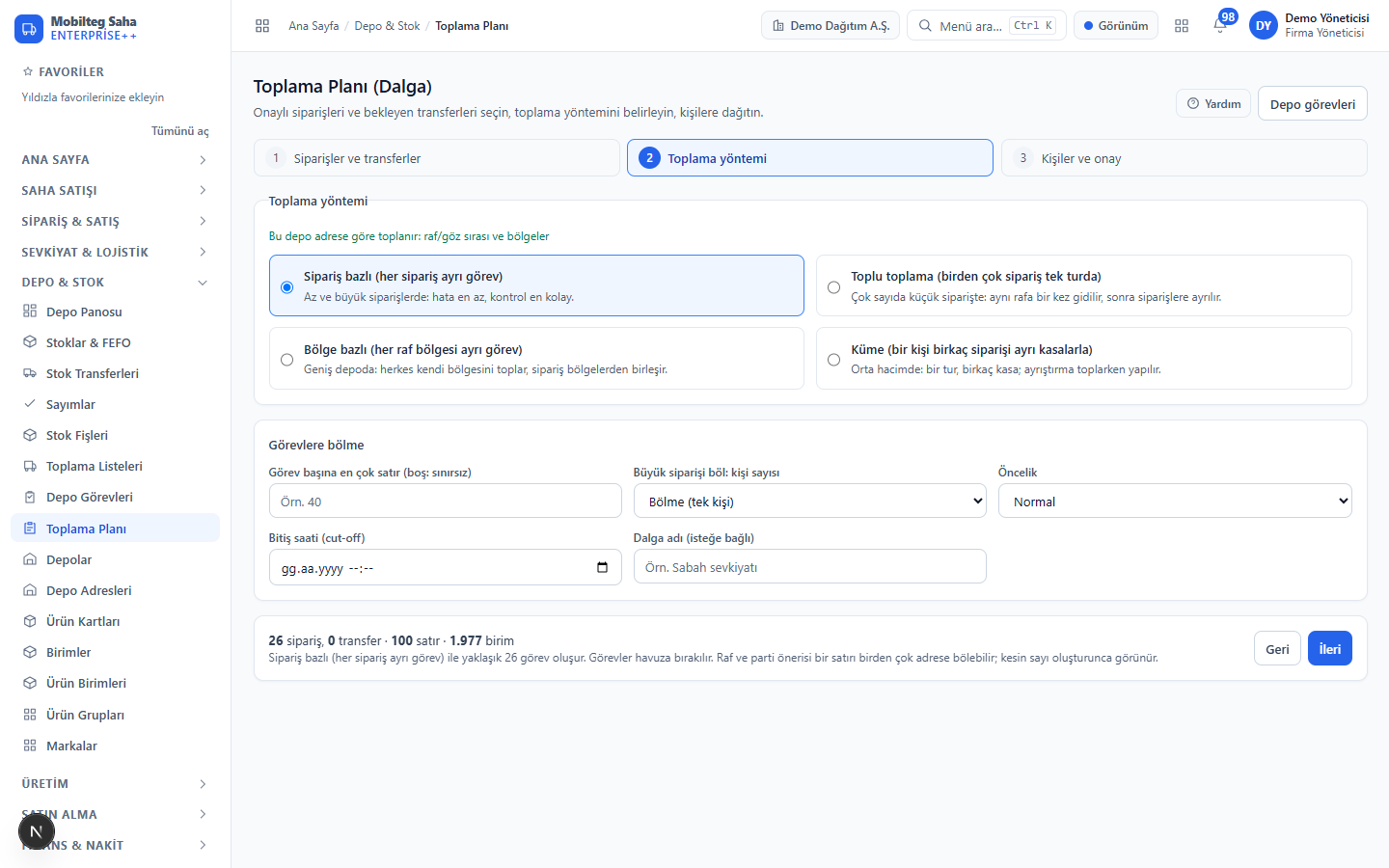
As in advanced warehouse management systems: orders is split into picking tasks in waves and assigned to people, dispatch and transfer tasks are assigned; everyone's work is measured and performance report is generated.

Wave planning: which orders, which method, to whom

Wave planning: which orders, which method, to whom

Select approved orders and inter-warehouse transfers, then choose order, batch, zone or cluster picking. A large order is split across several people, and tasks are assigned in turn or as a team, or left in the pool if required.

Four picking methods

Order-based, batch, zone and cluster; chosen according to warehouse size and order profile.

One order, several people

A large order is split into shares by shelf sequence; even a single large line is split by quantity. When all shares are done, the list closes automatically.

Dispatch and transfer tasks

Vehicle loading and outbound inter-warehouse transfers are tasks too; they are assigned to several people, and during loading each scan is credited to the person who scanned it.

Measured work, fair comparison

The figures come from the work itself: scans, shortages, errors and actual working time; breaks are excluded, and the target is the company's own.

Recently added

Features from recent releases — all live in production.

Saha AI

Ask your company questions in plain language; daily management summary, pre-visit briefing, orders from WhatsApp messages and paper, expenses from receipts, collections from cheques, goods receipts from delivery notes, customers from business cards. Early warnings, demand forecasting, collection and call agents, voice control. Connect your own model (DeepSeek, OpenAI, Claude, Gemini, local model).

Warehouse task management

Orders are split into picking tasks in waves: order, batch, zone or cluster picking; a large order can go to several people, and tasks to individuals or a pool.

Dispatch and transfer tasks

Vehicle loading and outbound inter-warehouse transfers are assigned as tasks to several people; during loading each scan is credited to the person who scanned it.

Staff performance

In the warehouse: lines/hour, pcs/hour, efficiency against target and accuracy; in the field: visits, conversion, sales and collections; in distribution: delivery success. Everyone sees their own scorecard on mobile.

Supplier Portal

The supplier confirms the order, proposes changes and ships goods with an advance shipping notice and QR label; invoices, payments, statements, reconciliation and quotations are on the portal.

Fixed assets and depreciation

Equipment, vehicle and machinery asset cards; monthly (pro rata) depreciation vouchers, opening accumulated depreciation and disposal.

Cost centre and budget

Expense, fixed asset and accounting lines are linked to cost centres; the annual budget is built month by month and compared with actuals.

BA/BS forms and VAT report

The monthly BA/BS counterparty list can be downloaded; end consumers are totalled separately. The VAT report does not include draft documents.

Multi-company consolidation

Sales, cost, gross profit and purchases of the group's companies side by side; intra-group trading is identified by tax number and eliminated.

CRM: leads, opportunities, complaints

From lead to customer, from opportunity to won; a customer complaint is linked to the related document, tracked against its deadline and closed with its resolution.

Competitor price and promotion suggestion

Competitor prices entered during shelf checks are compared with your own prices; promotions that stay within the cost floor are suggested.

Vehicle capacity and trip cost

Load weight is compared with the vehicle's capacity, and exceeding it requires a reason; each trip's mileage, fuel, motorway toll and parking costs are broken down per km, stop and kg.

Automatic replenishment and early payment discount

Purchase requests are created automatically from min/max and reorder points. Cash discount for customers who pay before the due date.

New in the field app

Discounts as amounts with a discount reason, odometer, trip-linked travel expenses, conditional surveys, shelf photos; customers are handed over from one sales rep to another in a single step.
From the screens

Real screenshots taken from the demo company.

saha.mobilteg.com
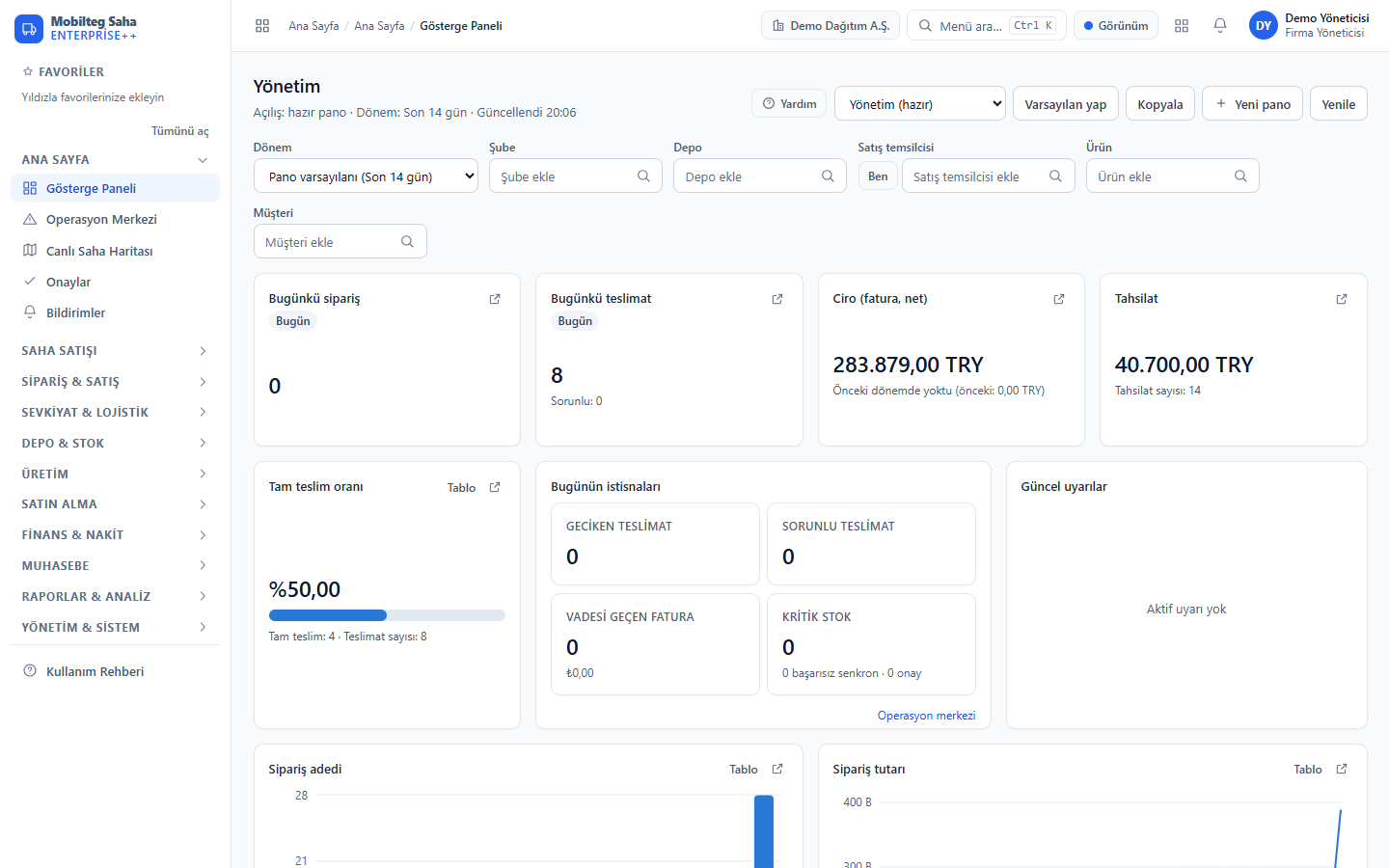
Yönetim panosu: Günün satışı, tahsilatı, sevkiyatı ve uyarıları tek ekranda; kartlar rol bazında düzenlenebilir.
The day's sales, collections, shipments and alerts on one screen; cards can be arranged per role.

For every team, end to end

More than a mobile ordering tool: the same data and the same rules from field to warehouse, from purchasing to accounting.

Sales reps and field salesSales management and CRMWarehouse and stock (WMS)Shipment and distributionPurchasingProductionFinance and cashAccountingManagement, reporting and control

Sales reps and field sales

  • Daily visit plan, GPS-verified visit check-in and outcome
  • Offline orders and quotations; price source and the customer's last 3 prices
  • Van sales: delivery note and invoice from the vehicle warehouse, e-Arşiv immediately or at end of day
  • Cash, card and bank transfer collections; cheque/promissory note photos and endorsement chain
  • Shelf check and shelf photo, competitor price, conditional field survey, field tasks
  • Order suggestions from the branch's past purchases; sharing PDF statements
  • Sales rep end of day: cash handover, document summary, vehicle stock count

Sales management and CRM

  • 360° customer: balance, risk, due dates, statement, documents, visits
  • Leads, sales opportunities and customer complaints
  • Quotation approval and one-step conversion to an order; bulk approval and cancellation
  • Price lists, customer groups, fixed-term customer contracts
  • Promotions (percentage, amount, buy X get Y free), 6-tier chain discount, turnover bonus
  • Targets and quotas: by sales rep, customer and product group, live from invoices
  • The regional sales manager sees only their own region and approves price and discount requests

Warehouse and stock (WMS)

  • Multiple warehouses, bin locations (zone, aisle, shelf, bin) and barcode put-away
  • Batch/lot and expiry date, FEFO issue; recall by lot
  • Pick lists: FEFO shelf suggestions, walking sequence, barcode scanning on handheld terminals
  • Task management: wave plan; order, batch, zone and cluster picking; splitting a large order across several people; task pool
  • Dispatch and transfer tasks: vehicle loading and inter-warehouse issues, multiple people
  • Staff performance: lines/hour, efficiency against target, accuracy, shortages and errors, individual scorecard
  • Barcode stock counts, inter-warehouse transfers, stock vouchers (receipt, issue, wastage, sample)
  • Automatic replenishment requests from min/max and reorder point
  • Warehouse dashboard: stock on hand, the day's receipts/issues, items without a location, negative stock and items nearing expiry

Shipment and distribution

  • Barcode-checked vehicle loading and route sequencing
  • Live vehicle tracking and the driver's own estimated arrival time
  • Proof of delivery: signature, photo and location; partial delivery and return collection
  • SMS to the customer on departure and on delivery (Gold SMS)
  • Vehicle capacity check; km, fuel, motorway toll and parking cost per trip
  • Driver end of day: cash handover, document summary, head office approval

Purchasing

  • Purchase request → approval → purchase order in one click
  • Partial or full goods receipt with a purchase delivery note; return delivery note and invoice to the supplier
  • From the incoming e-Fatura inbox to purchase invoice; matching by supplier product code and package barcode
  • Supplier scorecard: on time in full (OTIF), return rate, price trend
  • Supplier accounts, payables ageing and supplier payments

Production

  • Bill of materials, production order, raw material consumption, scrap and yield, batch cost
  • Requirements planning (MRP): suggestions become purchase requests or production orders
  • Capacity and OEE: line-day load, availability × performance × quality, downtime records
  • Subcontract production: raw materials and finished goods at the subcontractor are tracked as a separate warehouse
  • Production output is held until the quality decision; production lines and shifts

Finance and cash

  • A collection is posted in a single transaction to both the account and the cash, bank or POS account
  • Cheque and promissory note portfolio: bank deposit, collection, bounced, endorsement chain
  • Bank statement, cash flow projection, due date calendar
  • TCMB exchange rates, multi-currency and automatic exchange difference revaluation
  • Credit limit and risk: an overrun is sent for approval and the decision opens a temporary limit; due dates from the payment plan
  • Staff advances and expenses (with receipt photo), approval and settlement

Accounting

  • Uniform chart of accounts; every financial event is posted to the journal automatically
  • Trial balance, journal, balance sheet and income statement; CSV export to your accounting package
  • Fiscal periods, pre-closing checklist, month-end and year-end closing
  • Fixed assets and monthly depreciation; cost centres and budget vs actual
  • VAT report, BA/BS forms, multi-company consolidation
  • Account opening balances and debit/credit vouchers, cost control

Management, reporting and control

  • Role-based and personal dashboards; the day's exceptions in the operations centre
  • Standard reports and Report Designer; Excel/CSV export
  • Approval workflows: price, discount, credit overrun, cancellation, expense; approval inbox on the phone
  • Audit trail (before/after), location checks, document signatures; linked documents, attachments and history on every record
  • Excel/CSV data import wizard (Logo, Mikro, Netsis header profiles) and signed webhook
  • Customer portal: customers see their own balance, documents and products

Mikro and Netsis integrated solutions

  • Mikro V16 / V17 entegrasyonu
  • Mikro entegre saha satış
  • Mikro B2B bayi sipariş sistemi
  • Mikro tedarikçi portalı
  • Mikro depo yönetimi (WMS)
  • Mikro entegre CRM
  • Mikro kalite ve izlenebilirlik (QMS)
  • Mikro sevkiyat ve dağıtım
  • Mikro mobil tahsilat
  • Mikro için yapay zekâ (Saha AI)
  • Netsis entegre saha satış ve depo
  • Saha satış programı
  • Plasiyer takip programı
  • Araçtan satış (sıcak satış)
  • Tedarikçi portalı nedir?
  • Gramajlı ürün ve kasa barkodu
  • Lot ve SKT takibi, geri çağırma

e-Belge (QNB eFinans)

Available once the company's own QNB eFinans account is set up per company and document type; passwords are stored encrypted.

  • e-Fatura from the invoice itself: lines, discounts, VAT, MERSİS, GTİP and customer product code
  • e-Arşiv: for van sales to end consumers, immediately or at end of day
  • e-İrsaliye on dispatch: with vehicle plate, driver and delivery address
  • e-Defter is sent to QNB
  • Incoming e-Fatura inbox: processed as purchase invoices
  • Credit ledger, alert below 20 credits, line health and retry
ERP integration

Field documents, in the right place in the ERP

Installed next to your ERP server Mobilteg ERP Connector, connects outbound to Saha only; your ERP database is never exposed to the internet. Master data comes from the ERP and documents go to the ERP.

  1. 1

    Document issued

    Orders, delivery notes, invoices, returns, collections, cheques/promissory notes, transfers or new accounts – in the field or in the office.

  2. 2

    Approval or automatic

    Rules per document type and branch/warehouse: automatic, with approval or off. The approver cannot be the person who created the document.

  3. 3

    Written to ERP

    In a single transaction, with the ERP's own number; if an error occurs, nothing is left behind. The same document is never written twice; a cancellation or change is not written as a new document.

  4. 4

    Validated

    Each written record is read back; ERP and Saha are compared every night, and a document deleted or changed in the ERP raises an alert.

From ERP to Saha

Accounts and delivery addresses, suppliers, products, units and barcodes, price lists, payment plans, group and custom codes, balance and risk limit, warehouse stock (as calculated by the ERP itself), sales reps and customer assignments.

From Saha to ERP

Sales/purchase orders, delivery notes, invoices and returns · invoice from delivery note (Mikro) · warehouse transfer · cash, card and bank transfer collections · cheques and promissory notes · new account card. Documents whose sales rep is not mapped to an ERP code are held before approval.

Supported ERPs

‘Verified’: passed acceptance testing on a real ERP database. ‘Not verified’: the code is ready and awaiting acceptance testing on a real installation.

  • Netsis
    Direct SQL — verified with every document type on a real Netsis company
    Verified
  • Mikro V16
    Direct SQL — verified on a real Mikro database
    Verified
  • Mikro V17
    Direct SQL — verified on a real Mikro database
    Verified
  • Logo (Go / Tiger)
    Cards, prices, balances and stock are read via SQL; documents go to Logo as XML import files
    Not verified
  • Zirve
    Accounts, addresses, product cards, barcodes and warehouses are read-only; no documents are written
    Not verified
  • NetOpenX REST / COM, Mikro API
    Printers are ready according to the manufacturer's documentation; printing is not enabled before acceptance testing
    Not verified
  • Nebim
    No connector in this version; works with Excel/CSV import
    None
Management console: connection wizard, live mappings, export rules, agent log, support bundle and approved updates. ERP passwords stay encrypted on that machine only.
Download ERP Connector

Field app: every role on its own screen

Android phone or handheld terminal; one app, with screens enabled according to the user's role.

Sales rep

  • Visits, orders, quotations, van sales
  • Collections, cheque/promissory note photos
  • Shelf photo, survey, task
  • New customer draft, branch location pinning
  • Vehicle stock and end of day

Driver

  • My route: stops and estimated arrival
  • Proof of delivery: signature, photo, location
  • Receiving returns
  • Odometer, travel expenses
  • End of day and cash handover

Warehouse

  • My tasks and ‘Next task’: barcode picking, shortage reporting
  • Goods receipt, vehicle loading and unloading
  • Count, transfer, stock voucher
  • Purchase orders and returns to suppliers
  • My performance: own lines/hour and accuracy

Supervisor and manager

  • My team today: who is at which customer
  • Approval inbox
  • Reports and dashboards
  • Notifications and announcements
  • Shipment and delivery status
  • Works without internet; the queue is sent once and in order when the connection is back, and conflicts are resolved on screen
  • Biometric lock (optional)
  • Menu based on user permissions
  • In-app updates
  • Document printing and PDF sharing

Field sales controls

You decide what the sales rep can do in the field; the rules are enforced on the server, not the phone, and every exception is written to the audit trail.

Price and discount permission

By role, with user-specific exceptions: price changes and their limits, price floor, 6-level chained discounts, amount discounts and a mandatory discount reason.

Customer location check

Selected operations cannot be performed outside the customer radius without permission; remote operations are reported as anomalies.

Sales rep warehouses and negative stock

Multiple warehouses per sales rep; negative stock is controlled by permission per warehouse.

Customer and region scope

A sales rep sees only the customers assigned to them, and a regional manager only those in their region; customers are handed over to another sales rep in one step.

Credit and risk gate

Orders and delivery notes without an order that exceed the limit or credit exposure are held and sent for approval; if the current balance in the ERP is higher, that balance is used.

Audit and location report

Exceptions and rejected attempts are in the audit trail, with the device location alongside the branch radius.

Packages

Modules are licensed as packages; a new company starts with a 14-day trial licence. Pricing is quoted according to your number of users and vehicles.

Modules and limits by package
Module
Start
Orders, distribution and stock. One warehouse, a small fleet.
Professional
Includes field sales, finance, back office and customer portal.
Corporate
All modules including production, unlimited.
Core (users, definitions, settings)IncludedIncludedIncluded
Orders and salesIncludedIncludedIncluded
Field sales (visits, surveys, tasks)—Not includedIncludedIncluded
Distribution (shipments, deliveries, vehicles)IncludedIncludedIncluded
Production—Not included—Not includedIncluded
Stock and warehouseIncludedIncludedIncluded
Finance (invoices, collections, accounts)—Not includedIncludedIncluded
Back office (advances, expenses, approvals, purchasing)—Not includedIncludedIncluded
Reports and alertsIncludedIncludedIncluded
Customer Portal—Not includedIncludedIncluded
User1050Unlimited
Vehicle525Unlimited
Customer5005.000Unlimited
Monthly orders2.00020.000Unlimited
Add-on module: 3D Twin Company (digital twin)

Not included in any paid plan; it can be added to any plan. A live 3D digital twin of the whole company: orders, production, warehouse, shipments, vehicles, office, collections – past, live and scenario.

Explore 3D Twin Company
Add-on module: B2B Store (e-commerce for customers)

Not included in any paid plan; it can be added to any plan. A B2B store for your customers that works like an e-commerce site, in your own theme: customer-specific prices and promotions, basket, quick order, order tracking, account and invoices.

Explore B2B Store
Add-on module: Supplier Portal

Not included in any paid plan; it can be added to any plan. Your suppliers use their own logins for order confirmation, advance shipping notices, quotations, invoice and payment tracking, account and BA/BS reconciliation, and document and IBAN management.

Explore the Supplier Portal
Add-on module: Dynamic Warehouse (bin-location warehouse management)

Not included in any paid plan; it can be added to any plan. Location-managed warehouse: shelf and bin locations, any lot in any location; picking tasks follow the walking sequence by location, zone by zone, and put-away is done by barcode.

Add-on module: Saha AI (your own AI model)

Not included in any paid plan; it can be added to any plan. Ask your company: AI assistant, daily management summary, orders from text, pre-visit briefing, reading receipts/cheques/business cards. Connect your own model (Claude, OpenAI, Gemini, DeepSeek or your own server).

Add-on module: Saha AI Credit (Mobilteg model included)

Not included in any paid plan; it can be added to any plan. All Saha AI features, with the AI model provided by Mobilteg and a monthly usage credit: no key or setup required.

In every plan

ERP Connector and ERP integration, user and permission management, customer and product cards, dashboards, data import, audit trail and the field app. An exported document goes to the ERP as long as its own module is in the package.

Request a quote

Download

Field app and ERP Connector; version, size and SHA-256 checksum on the download page.

Field app (Android)

For sales reps, drivers, warehouse staff and field managers. Installed as an APK on a phone or handheld terminal; can also be downloaded via QR code. Updates itself.

APK download page

ERP Connector (Windows)

Service and management console (MSI) installed next to the ERP server. Netsis and Mikro V16/V17; Logo and Zirve reading not verified.

MSI download page

Request a demo or quote

Fill in the form and our team will call you to discuss your needs. For a demo request, we walk through the screens together using a scenario close to your own data; for a quotation request, we price according to your number of users and your ERP.

  • We will get back to you within one working day.
  • If you use Netsis or Mikro, we will demonstrate the integration with your live data.
  • Your details are used only for this request and are not shared with third parties.
Request type
Enterprise architecture & security

Zero data mix-ups, uninterrupted field operations

Database-level isolation

Each company is isolated with PostgreSQL row-level security (RLS); even an application bug cannot expose another company's data.

Offline field work

Sales, orders and collections carry on even when the internet is down; they are sent once and in order when the connection is back.

Full audit trail

Master data is never physically deleted; who changed what and when is stored with before/after differences.

ERP security

Only the agent on your own server connects to the ERP; passwords are encrypted on that machine and never go to the cloud.

Role, region and customer scope

With preset roles (sales rep, regional manager, warehouse manager, accounting, IT administrator…) or your own roles; scope is enforced on the server.

Multiple companies, multiple branches

Multiple companies and branches under one tenant; the letterhead of the issuing company, number series per branch.

© 2026 Mobilteg Yazılım — Mobilteg Saha
3D Twin CompanyB2B StoreSupplier PortalMikro and Netsis integrated solutionsPackagesDemo / quotationDownloadsUser sign-inUser manualPrivacyCookies and KVKKCustomer portalB2B Store sign-inSupplier login